PRINT, COLOUR & PLAY
QuiverVision is an augmented reality (AR) technology with a three-dimensional (3D) focus. The application supports both learning and fun in an interesting, creative way. Children of all ages have always loved colouring pictures where they can apply their own artistic vision, the QuiverVision application now brings the unique colouring creations to life in 3D which can make a magical educational experience. QuiverVision Education encourages students to unleash their creativity while learning a range of subjects which brings benefits to a student in terms of better learning and improved mental health (Cropley, 1995).
How does this work
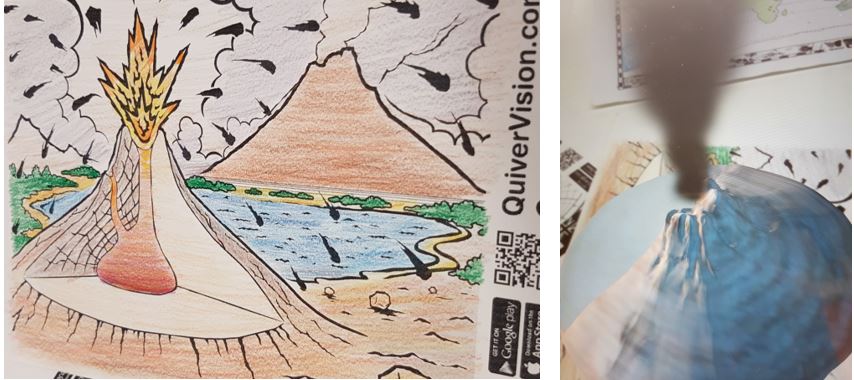
The application is straight forward and simple to use. QuiverVision Education provides the same magical AR experience and is designed with educators in mind. Educators can access and print a range of pages either from the app or through the online web page. Students then use their creativity to colour the pages with normal pencils. Using a smart device that has the QuiverVision app installed and with a simple press of a button, the page comes to life in the form of an animation in the exact colours the student has chosen. Students are then able to move the device around to explore the 3D scene at different angles.
How it can be used in the classroom
Student’s coloured page comes to life in an unique way, giving the student a special sense of ownership and pride, which helps increase the feeling of responsibility and engagement. A strategic factor that can increase a students’ creativity and confidence is to design open ended lessons that will enable them to follow their own pursuits (ViewSonic Education 2017).
For younger students the colouring pages can be used as a story or writing prompt. Students can name the characters on the page and tell a story of what they think is happening on the page or write a description. For older students the pages can be used to develop a digital story. This can be done individually or in collaborative group work.
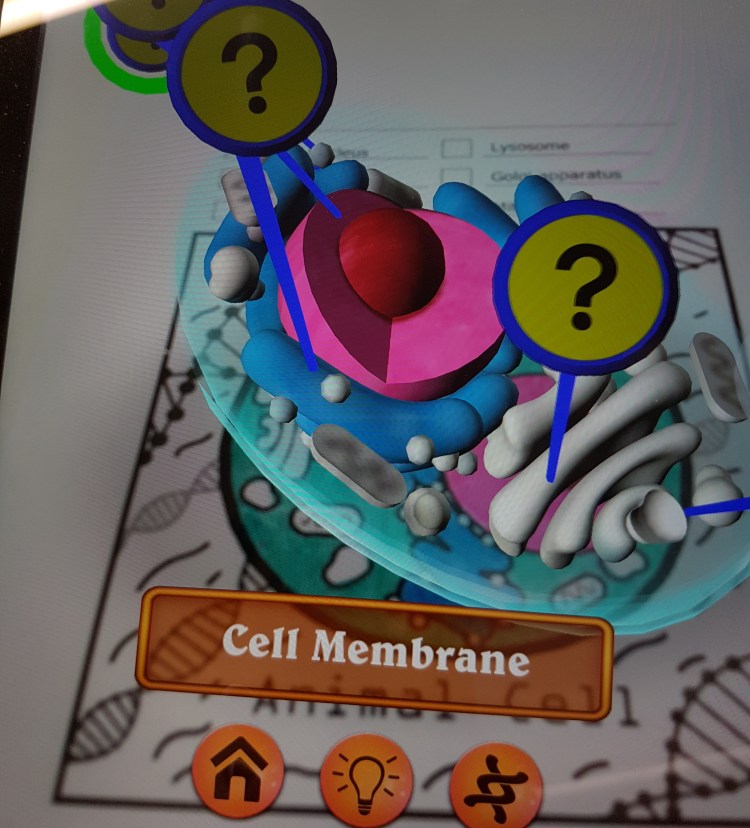
The educational colouring pages have interactive features which allow students to engage with their creation. Students can play and pause the animation and capture photos and videos. There is also a feature where students can play games and be quizzed to test their knowledge. While trialling the app I was able to touch parts of a cell, pop ups appeared with what the part is called and its description (see picture below)
QuiverVision is cost friendly, accessible and effective. it is grounding students with the competencies and know how.
Reference
Photos: Own photos
Cropley, A. J. (1995). Fostering creativity in the classroom: General principles. In M. Runco (Ed.), The creativity research handbook Vol. 1(pp.83-114). Cresskill, NJ: Hampton Press.
ViewSonic Education. (2017). Augmented Reality in Education: The ‘Why and How’ of Faster Learning and Improved Communication Skills pt.2: ‘The How’. Retreived on 6th March 2020. https://education.viewsonic.com/augmented-reality-education-learning-2/


Hi Christina!
I love all the images you have included! This really supports your post as I can visualise what you are describing. I like even more how they are your own images; it provides your post with credibility as I can see you yourself have had a play with it!
I agree, this would be a lot of fun to play with, it almost seems magical! However, I do think it is a little bit of a novelty, as it does have its limitations and downfalls. I think if you were to point these out, it would make your critique a little more well-rounded. It seems fun at first, but at closer inspection it becomes clear how the students may not be creating their own understandings. Students are colouring in a pre-determined image that then presents pre-determined information.
Nevertheless, this emerging technology is awesome, and you have pointed out some really good opportunities for it to be used within the classroom. Hopefully it can continue developing so students can create their own images and animations 🙂
LikeLike
Hi Christina
Your post is very well structured and your ideas on how you could use them in the classroom are also very well thought out particularly on open ended lessons. I really think Quiver Vision and AR in general has the capacity to become a great educational resource but I just don’t think its there yet. With Quiver vision specifically I can see how the novelty of it can quickly wear off and the educational possibilities are very limited to what is already provided. If teachers were able to create their own pages and if the interactivity was improved I think Quiver vision could become something really great! Your post is very well thought out and summarises how Quiver vision could be used in the classroom very well.
LikeLike
Your blog post was well structured regarding QuiverVison and AR. I’m impressed how you are using your own images to help support the use of QuiverVision in the classroom. I understand how the technology can become a great educational resource however, I believe the limitation and downfalls are apparent. If teachers and students are able to create their own pages I believe there will be greater learning opportunities for the students.Overall, the emerging technology is impressive and your points have identified some great opportunity for it to be used within the classroom.
LikeLike